Product Design Inclusive HCI Co-founded 2017–2021

A 360° robotic companion
for wheelchair users.
Loro helped people with limited movement
communicate, point, and control their surroundings

I led the product from early research
to prototypes, pilots, and launch (CES 2020)
Company
Loro / Lulu
Role
Co-founder & CEO · Product Design Lead
Year
2017 – 2021
Platform
Hardware · iOS · AI · AAC
Lulu / Loro
Key Metrics
60+
Live user tests · 6 disability conditions
4
Prototype generations
42
Validation
metrics
$450k
Funding
secured
2
US provisional patents
WHAT WE BUILT
From hardware to software — two products, one interaction architecture
2017 — 2020
Loro — Wheelchair-mounted HRI system
A 360° camera companion that helped users
see, point, speak, and control their surroundings
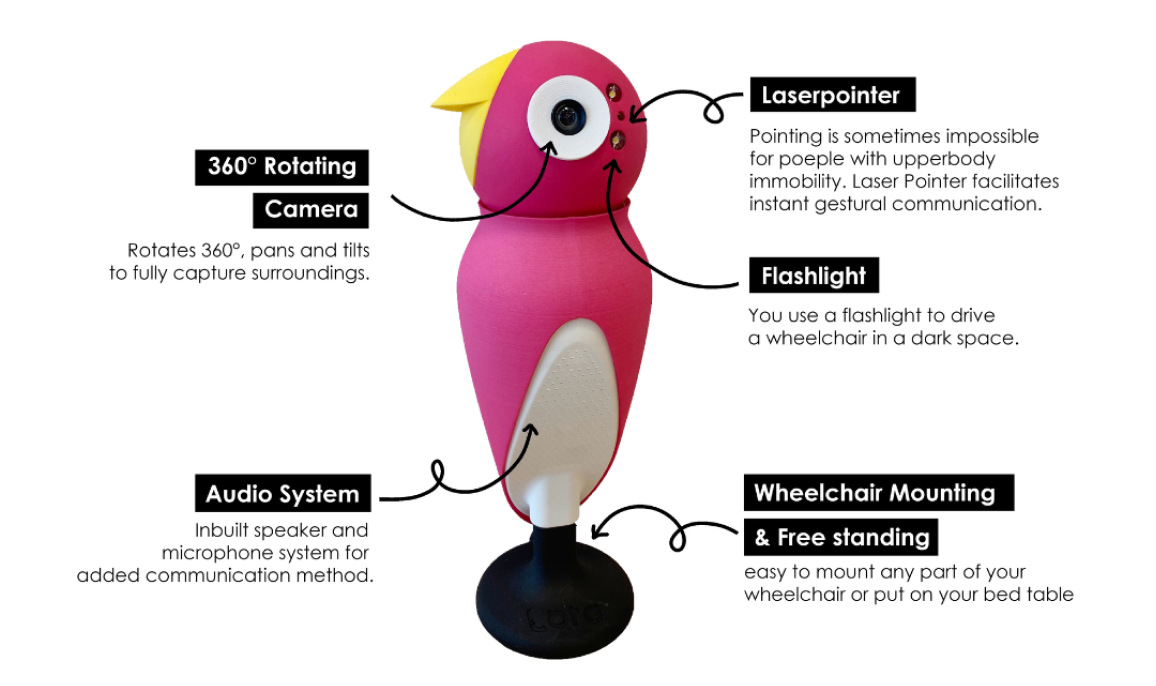
Loro Gen 4 annotated product photo — 360° camera · laser pointer · flashlight · audio · wheelchair mount
360° Rotating Camera
Look around without neck movement
Face Recognition + Name Overlay
Identify familiar people in seconds
Gaze-friendly UI
Switch modes with less cursor movement
Smart Home Control
Control lights, temperature, security, and windows
2020 — 2021
Lulu — AAC software platform
Lulu made Loro’s communication experience
available without dedicated hardware
Context understanding — sees a water bottle, suggests "Can I have some water?"
~70% typing time reduction
Frequent phrases in 1 gaze-click
WHAT WE PIVOT
The core interaction moved to software
while hardware remained an optional performance layer

When the body cannot move, interaction must adapt

We worked with users across ALS, MS, SCI, CP, and other mobility conditions.

The goal was not to add more features but to find what each user could actually control.

(image) In-home user research, Boston, 2019.

We visited 30+ users in bedrooms, living rooms, and ALS residences to observe how physical limitations shaped everyday interaction

Condition Motor Profile Speech Primary Input Used N (Tested)
Amyotrophic Lateral Sclerosis (ALS) Progressive full-body paralysis Dysarthria / anarthria Eye-tracking, head-mouse 30+
Multiple Sclerosis (MS) Variable, often partial paralysis Dysarthria / anarthria Touch, joystick 8
Spinal Cord Injury (SCI) Paralysis below injury site Largely normal Voice, joystick, head control 7
Cerebral Palsy (CP) Spasticity, limited speech Limited Eye-tracking, switch 6
Muscular Dystrophy (MD) Progressive muscle weakness Limited Joystick, touch 5
Geriatric wheelchair users Sensory + physical combined Largely normal Touch, voice 4+
FIELD RESEARCH REVEALED 3 BARRIERS TO INDEPENDENCE
01
Limited Vision
Restricted neck mobility made surroundings hard to see
02
Slow Communication
Standard TTS tools were too slow for real conversation
03
Caregiver Dependency
Simple daily actions still required caregiver help

"We are forced into dependency when we are perfectly capable of independence given the opportunity."

— Margaret L., ALS user · In-home interview, Boston 2019

Why Loro had to be wheelchair-mounted

The decision was not about choosing a device type. It was about excluding options that failed the user’s core constraints.
We compared four alternatives and converged on a 360° camera mounted to the wheelchair.
Alternative reviewed Potential upside Reason for exclusion
Smartphone app alone Fastest to build Required hand use or head movement
Tablet mount, no camera Familiar AAC setup Did not solve limited vision
Social robot (Jibo / Kuri-type) Socially familiar form Separated from the user’s wheelchair
Action camera Strong 360° hardware No AI, control, or conversation support

Four-criteria decision rule

The form had to meet 4 conditions

1. See without moving — Expand vision without neck movement
2. Stay with the user — Attach to the wheelchair, not the room
3. Respond quickly — Use on-device intelligence for low-latency support
4. Accept multiple inputs — Work with existing assistive devices

No existing product met all four conditions - That gap became the starting point for Loro.

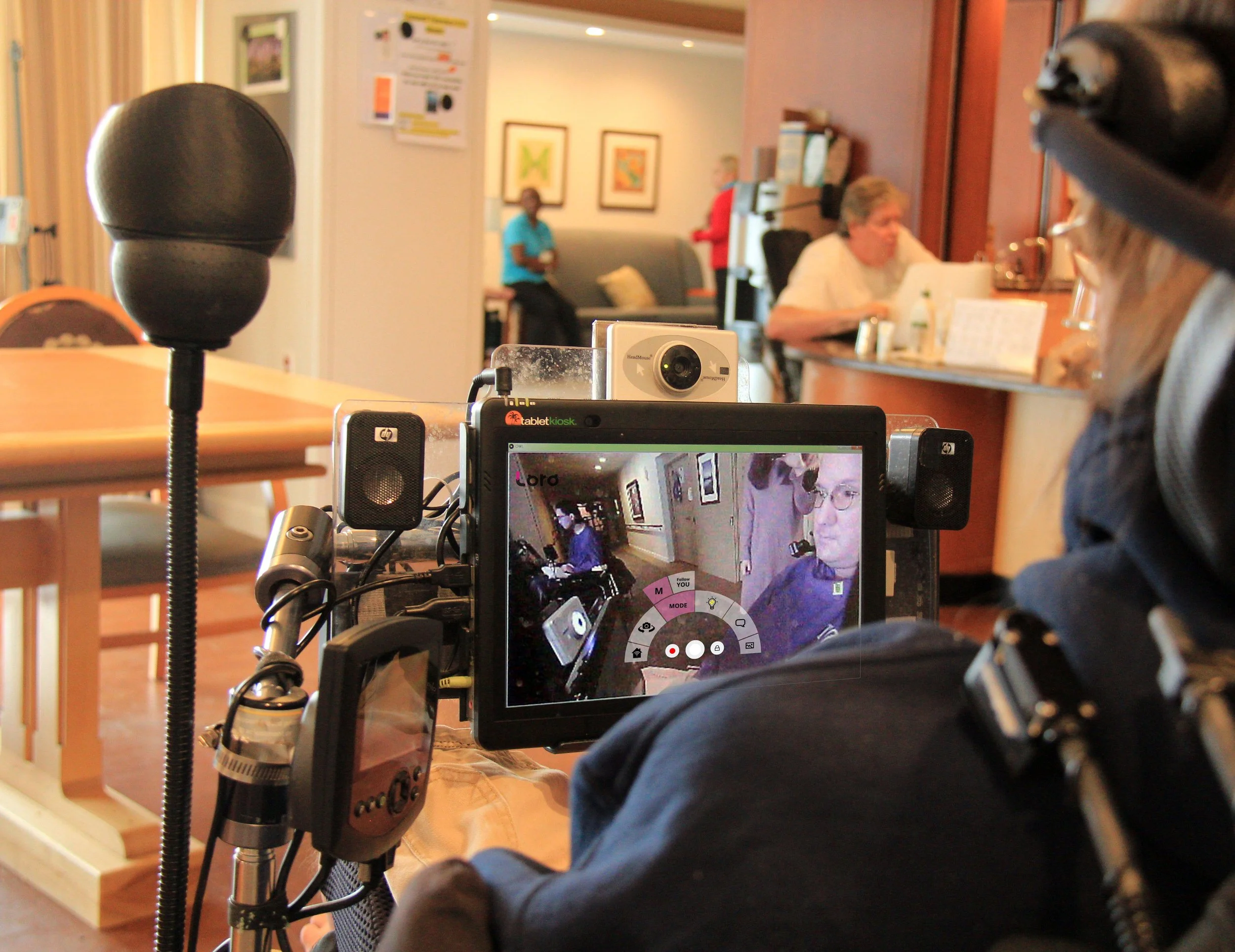
A camera that sees socially.

360° rotation alone was not enough

We added recognition, tracking, and accessible controls so users could understand who was nearby and respond without moving their head.

Face Recognition + Social Cue

Displayed a familiar person’s name and basic facial cue

so users could understand who was approaching

Eye-Gaze Radial UI

Grouped key modes within 60°

to reduce cursor travel and dwell-time errors

3 interaction layers on the same hardware
Layer Role HRI insight
Rotation control Control the camera through gaze, voice, or radial menu Expands vision beyond neck mobility
Face recognition + name overlay Recognize familiar people and show their names Restores social awareness
Follow-mode tracking Track a selected person as they move Supports natural conversation presense.

"When he went to a bar with friends, he was able to use Loro to see around him. He found Loro most useful in everyday tasks that brought light to what he could not see before."

— John, ALS user, age 50 · 10-day in-home test, 2019

One robot, five ways in

Different users had different ways to control the system.

Any input could trigger the same core functions.

Input Options

Eye gaze · Head mouse · Switch · Voice · Touch

Control the Room

Loro extended the same input model to smart home actions

Point Instead of Typing

Users could point at objects when typing was too slow

Closing the 10-minute sentence gap
Layer 01
Context Suggestions
"Water bottle" becomes

"Can I have some water?"
Layer 02
Smart Compose (ML)
Full sentences in one action

not word by word
Layer 03
Personal Library
Essential phrases

one gaze-click away

"The first thing to bring artificial intelligence that is accessible to the disabled. Loro is a game-changer."

— Steve Saling, Co-founder ALS Residence Initiative · Advisor

Four prototypes one expanding user group

Each prototype was shaped by the users before it.

With every iteration, Loro served a wider range of mobility conditions.

VHA Pilot

6-week field pilot with ALS, MS, and SCI wheelchair users

User story · Gustavo, age 18, Chile

Gustavo has cerebral palsy, limiting his speech and voluntary movement. Before Lulu, he communicated with his family through eye-blink signals.

1. Learn
Uses eye-tracking to interact with Lulu
2. Try
Expresses his own name for the first time
3. Connect
Creates his first full sentence

and joins a family conversation
2017.10
Prototype I — MIT Hacking Medicine ALS Hackathon
360° servo motor with GoPro. Hackathon win surfaced key insight: vision is the most underserved interaction channel.
2018.03
Prototype II–III — User-led feature expansion
Eye-gaze control, laser pointer, TTS, STT added — all from direct user requests, not internal assumptions.
2018.07
Prototype IV — 30+ user tests, full UI redesign
Migrated to Windows for AAC compatibility. Radial menu UI and AWS Face Recognition introduced.
2019.07
VHA Pilot — Boston & New England
10–15 ALS, MS, SCI users over 6 weeks. 42-metric validation framework applied.
2020.01
CES 2020 — Eureka Park launch
3-day showcase. Secured ~$450k. TechCrunch, Forbes, AWS, NAVER coverage.
2020.12
Loro → Lulu — software pivot
COVID halted hardware. Extracted core intelligence into Lulu — runs on users' existing devices.
2021.06
INSEAD Venture Competition — Patrick Turner + Social Impact Prize
Final external validation before strategic pivot decision.

From ALS hackathon to CES 2020

Three years of field research, healthcare pilots, and four prototypes turned an early concept into a global assistive technology launch.

Field Validation

Tested with wheelchair users, ALS patients, and veterans

in real mobility contexts.

Global Recognition

Featured in PN Magazine and TechCrunch Disrupt Berlin 2018 semi-finalist

Awards
CES 2020
Eureka Park Contest Winner
Las Vegas · 2020.01
MIT Hacking Medicine
1st Place — Assistive Tech
Cambridge · 2018.05
Microsoft Imagine Cup US
3rd Place
San Francisco · 2018.04
University Startup World Cup
1st Place
Luxembourg · 2019.10
AARP Innovation
1st Place — What's Next
New Orleans · 2019.04
INSEAD Venture
Patrick Turner + Social Impact Prize
Paris · 2021.06
More Work View all →